
Source-grounded fundamental research

Ask. Analyze. Alpha.

A research platform for fundamental investors

Get analytical reports, verifiable answers, and company-history workflows solely from primary sources. Start with prepared coverage, ask Dbot follow-up questions, and compare companies without digging through every filing from scratch.

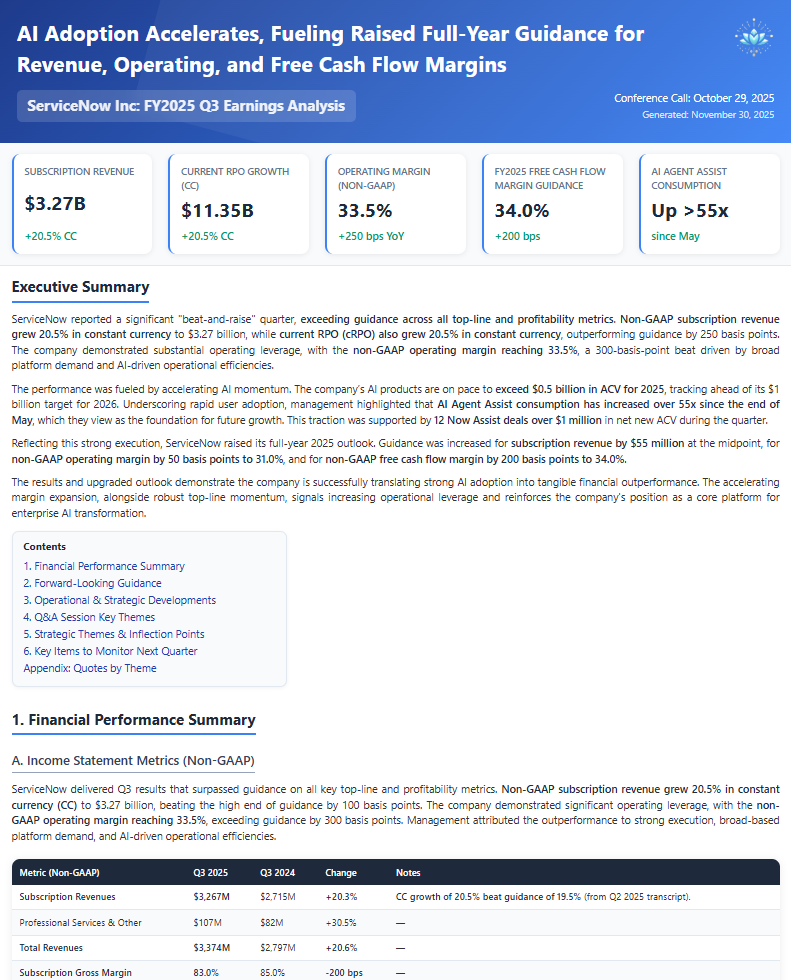
DFin research report preview for ServiceNow earnings analysis
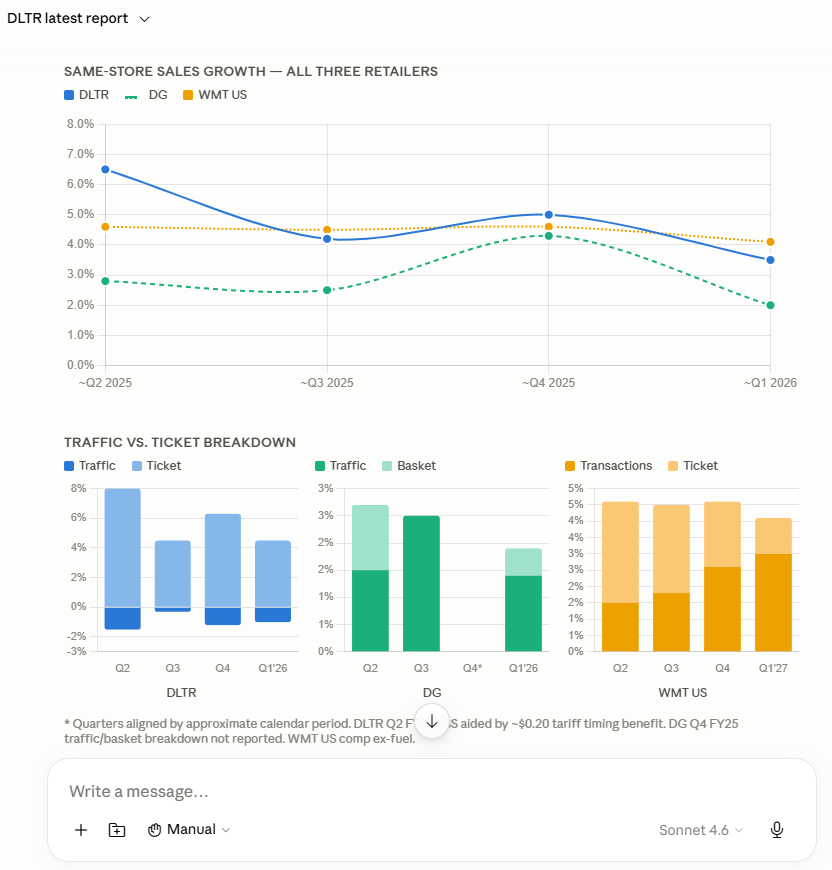
Dbot research assistant comparing multiple public companies
0
Companies in Database
0
Filings in Database
0
Companies Covered
0
Reports Published

Your Search for Quality Ends Here

Serious investors need to track more names, more earnings calls, and more second-order exposures than humanly possible. DFin gives you a prepared research layer first and lets you go deeper with primary research.

Prepared Research Reports

Start with analytical company reports built from filings, transcripts, and structured financial context. Spend less time assembling the basics and more time judging the investment case.

Coverage That Scales

Follow more companies without accepting shallow coverage. Use DFin to keep a wider investable universe on your radar while preserving a consistent research process.

Ask Follow-up Questions

Reports are the starting point. When a question comes up, ask Dbot to go back into the filings and transcripts so the answer is grounded in company source material.

Choose Your Universe

Pick the companies you actually care about. Build coverage around your watchlist, portfolio, competitors, suppliers, customers, or idea pipeline.

Accessible Research Economics

Institutional-style research tools should not require institutional budgets. Use subscriptions for coverage and pay-as-you-go credits for interactive Dbot work.

Built for Monitoring

Use DFin before earnings, after earnings, and between events. Reports, Dbot, and Chronicle are designed to help you maintain context as companies evolve.

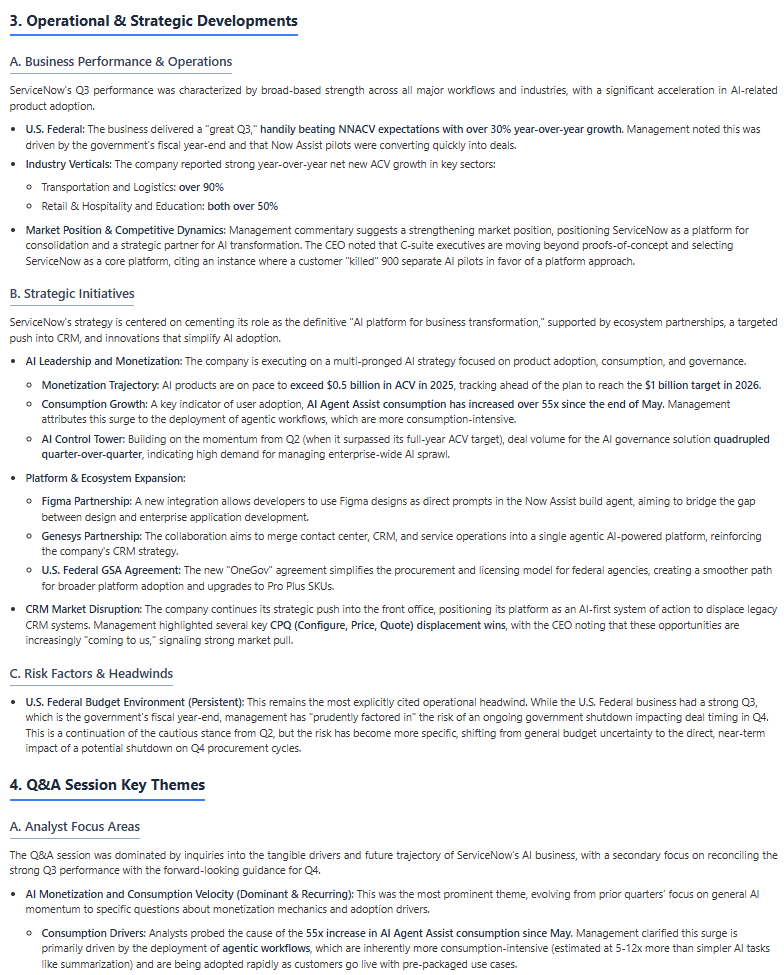
Analytical reports, not just summaries

Prepared coverage for earnings review, thesis monitoring, and follow-up research.

ServiceNow earnings analysis report screenshot
Detailed DFin research report screenshot for ServiceNow

Chronicle: Understand the company story

Trace the filings, earnings changes, and strategic shifts that shaped the business.

Dbot: Get better answers from filings and transcripts.

Dbot chat screenshot comparing Walmart, Dollar General, and Dollar Tree


Compare peers, customers, and suppliers in one research thread

Dbot chat screenshot analyzing Deere business segment details


Drill into segments, margins, and business drivers

Dbot chat screenshot showing response verification for Synchrony Financial


Verify important answers before they enter your thesis

Dbot chat screenshot calculating custom public-company metrics


Pull non-standard metrics when canned data is not enough

Dbot chat screenshot generating summaries, CSV output, and slide outlines


Turn research output into summaries, CSVs, and slide outlines

Idea discovery

Find the names worth researching

Use the free screener to filter down to the promising names for deeper research work. No subscription required.

01
Build the screen you want

Hundreds of filters with thousands of combinations to find companies by country, market cap, ROIC, margins, leverage, growth, valuation, shareholder returns, and other fundamental metrics.

02
Compare the field

Review table columns, sort by the metrics that matter, and visualize companies in 2D or 3D to spot outliers and clusters.

03
Research the short list

Move from screened candidates into reports, Dbot follow-up questions, and Chronicle context before a company enters your thesis.

Start with coverage, then go deeper

1
Choose Coverage
Choose the coverage tier that fits your watchlist, portfolio, or research pipeline. Annual plans include a discount and additional Dbot credits.
2
Add Companies
On the Research Access page, add the companies for which you want the reports.
3
Research Deeper
Review reports, ask Dbot follow-up questions, and use Chronicle to keep the company story in context. Monitor usage on your account page.

Pay As You Go

Explore Dbot with credits.
No subscription required.
$ 0 / Mon
Dbot: PAYG Credits
Latest AI Models (10+ models used)
Research Report: 1 company
ETF Details & Analytics
Select
Paid Plans

Base

Best for focused watchlists
$ $9.99 / Mon
All Free Features
Dbot: Purchase credits @ PAYG rate
Research Coverage: 5 companies
Earnings Transcripts: 5 companies
Custom Watchlists
Annual Plan Benefits
10% off compared to monthly price
Dbot: $9.99 in free annual credits
Pick Base

Pro

Best for broad coverage needs
$ $49.99 / Mon
All Base Features
Research Coverage: 100 companies
Earnings Transcripts: All companies
Annual Plan Benefits
10% off compared to monthly price
Dbot: $49.99 in free annual credits
Dbot: Get 20% bonus credits when you purchase additional credits
Go Pro!


Dbot FAQs

Basics

How do I start chatting?

Click on the little chat icon at the bottom right of the screen. It should be visible on most pages on the site.
Chat icon location at the bottom right of the DFin interface
You have 4 core levels to choose from: off, low, medium, and high. Set the default model on your account page. If you want to use a different model, start your question with the command:
  • /off Who is the CEO of Microsoft?
  • /mid Why does AMD report amortization in COGS?
Use the /help command when chatting to get the full list of commands you can use.
Dbot uses more than 10 different models together in a seamless manner. These models are bucketed in the 4 categories based on their capabilities, their ability to think, context length (how much data they can work with), and speed. Our house-default setting is 'low'. We recommend starting with that and then moving up or down based on needs.

More advanced models typically have more internal knowledge and context lengths that can be used. If you can't get the answer you're looking for, often just moving up one level and asking the same question again will get you a good answer.

For example, if you are using the 'low' intelligence level, try asking the same question with '/mid' or '/high' at the start of your question. This will switch the model to a more advanced one that can provide better answers.

Once you select a new intelligence level, the subsequent interactions will continue using that level until you change it or exit the conversation.
Use the '/web' trigger to search the web. A good reason for including web search is to bring in data into your research work that is not included in filings. This includes potentially detailed industry knowledge (e.g. /web How long does it typically take to develop a new drug for hypertension?), product reviews, policy changes, etc.

Once the data is in the conversation context, you can use this context (fancy way of saying chat history) to provide important information to the LLM to generate better answers.
Our coverage is increasing every single day - both in breadth (number of companies) and depth (historical coverage). We currently cover S&P 500 and Russell 1000 companies.

We will soon expand to include US-listed ADRs as well. Additional global markets will follow in due course.

Customers can request companies for inclusion. Please email us with your requests.
Dbot is excellent at diving in to details about companies' filings. You can pull the as-reported financials, discuss details about the various segments, analyze evolution of margins, compare with competitors, etc. If the data is in the filings, Dbot will get it for you. If you notice its struggling, move up to the next higher thinking level to try and get your answer.

If you would like to perform complex analysis, we recommed building up to the ultimate query gradually. If running analysis across multiple companies and multiple time periods, start with one company, build up its history, then proceed to the next. Once you have built up the context, you can then ask the agent to perform the ultimate analysis.
LLMs are still a relatively new technology, so there are always pitfalls. Treat Dbot like a smart junior analyst - the work will most likely be done well, but if your life depends on it, then best to verify. Here are some key aspects to keep in mind:
  • We have strived to minimize hallucinations, however we recommend verifying information with the references. You can use our 1-click verification to have another model "peer-review" the results.
  • To ensure the best results, we recommend providing sufficient detail and guidance in the question. The better the framing of the question, the higher the likelihood of the response matching your expectations.
  • Things will likely blow up if you ask it to run very complicated analysis up front. Particularly challenging scenarios are where questions require searching and analyzing multiple companies and multipe time periods in one shot. We recommend building up to complex topics in a step-by-step fashion.
  • Complex queries are best attempted at the 'high' intelligence levels.
  • If you notice the agent is going down the wrong rabbit hole, you can use /stop to halt execution.
  • You can also use /clear to clear the internal working memory. This can help to reset the agent's train of thought without losing your existing chat context.

Pricing

How does PAYG work?

We strongly feel that research tools shouldn't be hidden behind multi-thousand dollar level subscription walls. Dbot's core capabilities are available to all users on a pay-as-you-go basis. Please purchase credits upfront to start. Usage is billed based on the models used and searches performed. Usage is measured in 'tokens'.
As there are numerous models operating in the background, the following table provides the pricing range that apply at any given thinking level. Units are dollars per million tokens.
Thinking Level Input Output
Off $0.5 to $1.2 $2.0 to $3.2
Low $1.0 $1.5
Medium $1.0 to $3.3 $10 to $13
High $5.2 $25

We recommend setting the the default intelligence level to Low for your work as it provides the best balance between cost and performance.
We use the token counts as provided to us by the LLM provider. It is important to note that internal agent traffic tokens are also billed, so one round of question-and-answer includes the tokens used in asking the question, in analyzing the data obtained from the search results, and in generating the final answer.

A simplistic example: A question consisting of 50 tokens, could generate search results of 30,000 tokens, and the final answer (including model's thinking process) could be 1000 tokens. In this case, 30,050 tokens are billed at the input rate and 1,000 tokens at the output rate. Additional tokens are also used within the agent for instructions and these are billed at a much lower rate. At the 'low' level, this would result in a cost of ~$0.03 for tokens + $0.01 for search = ~$0.04.

Usage is billed down to 4 decimal digits.
In addition to token usage charges, there are fixed charges for search as outlined below:
  • Filings database: $0.01 per instance
  • Web search: $0.05 per instance
An instance is loosely defined as each time the agent turns to the respective data source. One instance of database search could range from 1 query in 1 document to 10 queries over 10-20 documents (possibly up to 200 different searches). Similary a web search instance is defined as each time the 'web' agent is called (and not per web search query).
Here are some important points to know:
  • Credits are purchasable in "packs" of $19.99.
  • Credits are non-refundable and expire 1-year from purchase.
  • We use Stripe for payment processing. We use email address for matching payments with the account here. You can either use the same email address for Stripe and for your account here; or alternatively, enter your Stripe-linked email address in the account page.